Book Published
After way too long, our book has finally been published. Check out the site at http://accumulobook.com, which will link to where you can purchase a copy.
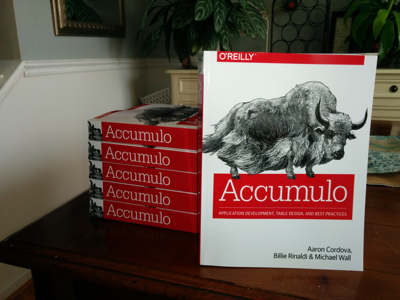
Thanks to my coauthors Aaron Cordova and Billie Rinaldi for making this happen.
Just a guy and his computer
After way too long, our book has finally been published. Check out the site at http://accumulobook.com, which will link to where you can purchase a copy.
Thanks to my coauthors Aaron Cordova and Billie Rinaldi for making this happen.
I am excited to announce our Accumulo book is finally in early release at http://shop.oreilly.com/product/0636920032304.do.

The animal on the cover is the Domesticated Yak. Yep, that’s right. We got the “Yak Book”.
Been meaning to write a post about my current Emacs setup for a while to explain how I work with Emacs on both Mac and Linux. I am going to call this my Emacs Workflow. I have been using this setup for over a year now with very few tweaks and it serves me well. I am currently using Emacs 24, but this setup worked fine for earlier versions.
First, let me explain how I work and what I was looking for out of an Emacs Workflow. I spend most of my time on the command line. That is either a terminal or eshell running in Emacs, with really no rhyme or reason for which. Although longer running things like tailing logs and stuff over ssh tends to crash Emacs so I typically do not do those things in eshell. Having used vim for a long time, I got used to quickly opening a file, making an edit, and then closing it. But I do find it helpful to have all the currently open files in Emacs available in buffers. Emacs daemon seemed to fit both of these, but I didn’t like starting it up in my init.el or on login.
Avdi Grimm wrote an article at
http://devblog.avdi.org/2011/10/27/running-emacs-as-a-server-emacs-reboot-15/
about how he launches Emacs and that got me started. I hadn’t used
emacsclient very much before this. The -a "" trick was exactly what
I wanted to start the daemon. Avdi uses this script to launch
emacsclient and create a new frame. By default, the terminal waits
for you to close Emacs, but you can pass in -n to the ec script and
return control back to the terminal immediately.
My workflow is a little different. When a file is opened in the
Windowed or GUI version of Emacs, I want to work on it and leave it open.
Often times I am heading back to the terminal to run a command against the
newly edited file, like rake test or mvn package. That mean the
terminal launching emacsclient shouldn’t wait. When there is a GUI
version of emacs already running, I want to use that instead of
opening a new frame. When a GUI Emacs is open but minimized, I want
to maximize it and then open the file there.
For quick edits, I want to open the file quickly in Emacs in the current terminal, make my edit, and then close it. Therefore, the terminal needs to wait for me to finish.
This method for quick edits is how I did all my git commits before I took the time to learn magit. If you haven’t used magit, I highly recommend you take the time to learn it. See http://magit.github.io/magit/magit.html. This is why I
export editor=etin my ~/.bashrc.
So what I ended up with is 2 scripts, which I call ec and et,
following Avdi’s lead. The former opens emacsclient in the GUI and
returns control immediately to the shell. The latter opens emacs in
the current terminal and waits. Because both scripts are backed by the
same daemon, all open files are available as buffers in both cases.
Both script will starts the daemon if it is not
open. The ec script has some extra code to switch focus as
described in my workflow. Here are the scripts, which what I hope are
useful comments.
1 2 3 4 5 6 7 8 9 10 11 12 13 14 15 16 17 18 19 20 21 22 23 24 25 26 27 28 29 30 31 32 33 34 35 36 37 38 39 40 41 42 43 44 45 46 47 | |
1 2 3 4 5 6 7 8 9 10 11 12 13 14 15 16 17 18 19 20 21 22 | |
These files can be found in dotfiles repo at https://github.com/mjwall/dotfiles. There are also instructions on how I install Emacs on a Mac and Linux. Also in this repo is my ~/.emac.d configuration. I keep everything together to make it as easy as possible to get setup on a new machine and keep multiple machines in sync.
If you are on a Mac, it is important to get the newer version of Emacs and emacslient on the path correctly. What has worked for me is referenced in the mac gist. Likely there are other/better ways.
Another way I use these scripts is by passing in -e to execute arbitrary elisp code. For example, I have an alias setup in my bashrc to launch magit. Because it is using the same script, it takes advantage of launching the daemon if necessary and changing focus. Here is what it looks like:
1
| |
So in the terminal, I run magit and it launches Emacs and runs
magit-status on the current directory. This was inspired by a
similiar tweet somewhere, but takes advantage of the rest of the ec script.
The last piece of this was a shell script to stop the daemon, which is
used for example when I need to reload Emacs configs. Sometimes
shutdown on my Mac hangs while waiting for Emacs to close, so I tend
to call this es script beforehand. The script looks like this
1 2 3 4 5 6 7 8 9 10 11 12 13 14 15 16 17 18 19 20 21 22 23 | |
Likely there is a good way to fix this hanging, but it doesn’t bother me so I haven’t dug deeper.
If you are still reading this, you may be thinking “This all makes me want to execute arbitrary elisp in a shell script for other things”. If so, and you looked at https://github.com/mjwall/dotfiles/blob/master/bin/ed.el, you would see the following example of how to do that
1 2 3 4 | |
Imagine the possibilities. Go through a git repo and change all tabs to spaces. I haven’t really though of anything useful to do with this, but thought it was interesting.
If you are not still reading this, you probably stopped because you thought all this was overkill. Maybe you are right.
Last week I came across a theme for Emacs called Ample at https://github.com/jordonbiondo/ample-theme. I loved the colors and general feel of the theme and starting using it immediately. It worked great and I really like it. The only issues I had was that rbenv.el in the modeline was an ugly red and the theme didn’t work in the terminal. So I started poking at the theme code. It is the first time I have ever opened up a theme and looked at tweaking it.
Along the way, I started looking at other themes. I kept coming back to zenburn-emacs at https://github.com/bbatsov/zenburn-emacs. I liked the way the code was organized and the little touches like automatically starting up rainbow-mode, which I had never used.
So I decided to try and combining the colors from Ample and the code from Zenburn into one theme. My result is available at https://github.com/mjwall/ample-zen. Zenburn had a bigger palette than Ample, so I added in some colors. I removed packages that I don’t use, and added some, like rbenv, that I do. For me, the modeline in the active window is important, so I tried to make that stand out. It appears to work OK running Emacs in the terminal as well.
Here is a screenshot

All the credit goes to Jordon Biondo for his colors in Ample and Bozhidar Batsov for his code in Zenburn-Emacs. Ample-Zen is currently available in Marmalade and a pull request has been merged to MELPA. Read more about installation at https://github.com/mjwall/ample-zen#installation
Switching to Octopress, see http://octopress.org/. I haven’t blogged in a long time, but I wanted to start again. Got some emacs stuff I’d like to get out. Anyway, here are some notes on my conversion.
Theme is Greyshade, see https://github.com/shashankmehta/greyshade. My color is #0020C2, see https://github.com/shashankmehta/greyshade/wiki/Sites-using-Greyshade. I really like the mobile format baked into the theme.
Exported old wordpress content with https://github.com/thomasf/exitwp. Worked great, after I cleaned up the xmllint errors. Looks like there was a few formatting issues, but I don’t care enough to fix them.
Found alias generator plugin for Jekyll at https://github.com/tsmango/jekyll_alias_generator. Just copied the alias_generator.rb into the plugins directory and added something like the following to the yaml section of every old post. Allows the old links to still work, in case anyone had linked to me.
alias: /original/link/from/wp/blog
Thought about migrating all the old comments over and using something like http://disqus.com/. In the end, I decided not to enable comments at all. Hit me up on twitter or google+ if you really have something to say.
So far, this has been really easy. I like it a lot. Nice to be using ruby again.
Quick post so I can remember how to access CLI args and Java system properties inside of a grails script.
Put this following code inside of your_grails_app/scripts/ScriptTest.groovy
target ( default : 'Print args and java system properties' ) {
    //grails script-test arg1 arg2
    println "Grails CLI args"
    println Ant.project.properties."grails.cli.args"

    //grails -Dprop1anything script-test
    println "Java system properties of prop1"
    println Ant.project.properties.prop1
}
So now you can run the following ` $grails -Dprop1=anything script-test arg1 arg2 Welcome to Grails 1.1.1 – http://grails.org/ Licensed under Apache Standard License 2.0 Grails home is set to: /Library/Grails/Home
Base Directory: /Users/mjwall/src/sample1 Running script /Users/mjwall/src/sample1/ScriptTest.groovy Grails CLI args arg1 arg2 Java system properties of prop1 anything `
According the Grails 1.1 Beta2 Release Notes, Grails 1.1 will have better Maven integration. I think that is great news allowing more integration between different java projects. It means this post may not relevant for very long though.
For all it’s complexity, I like maven. Sometimes it makes complex tasks easier, but not always. Here is my situation. There are several java projects already using maven. I am building a grails project that will be used by some of these projects. The easiest integration is to package up a war file and deploy it to our local maven repository. Nexus is great by the way. The other projects can include my grails project as a dependency. So what is the best way to do that? Right, I hear you. By hand. However, I need to automate this.
I looked at the grails-maven-plugin, but it is too much. I am not trying to mavenize my project, just deploy it to Nexus.
Luckily, there is as a cleaner answer. Creating scripts in grails is easy. Those scripts can use the maven-ant-tasks. Download the jar file and put it in your lib directory.
I’ll create 2 tasks, one handle the ‘maven install’ so I can test locally and one to handle ‘maven deploy’. We need a pom file, but instead of checking one in, let’s generate it from the project so it picks up the latest version etc. (Note, I studied the gant build file pretty closely). Here is an example of MavenInstall.groovy file from the scripts directory
1 includeTargets << grailsScript ( ”War” ) 2 3 final antlibXMLns = ‘antlib:org.apache.maven.artifact.ant’ 4 final tempPomFile = “pom.xml” 5 6 target (preparePom : “Generate a temporary pom file”) { 7 depends(packageApp) //so config.maven properties are loaded 8 def writer = new StringWriter() 9 def builder = new groovy.xml.MarkupBuilder(writer) 10 builder.project(xmlns:“http://maven.apache.org/POM/4.0.0”, 11 ‘xmlns:xsi’:“http://www.w3.org/2001/XMLSchema-instance”, 12 ‘xsi:schemaLocation’:“http://maven.apache.org/POM/4.0.0 http://maven.apache.org/maven-v4_0_0.xsd”) { 13 ‘modelVersion’ ‘4.0.0’ 14 ‘groupId’ ‘com.mjwall’ 15 ‘artifactId’ grailsAppName 16 ‘packaging’ ‘war’ 17 ‘version’ grailsAppVersion 18 } 19 20 File temp = new File(tempPomFile) 21 temp.write writer.toString() 22 def pom =ant.“${antlibXMLns}:pom” ( file : tempPomFile , id : tempPomFile ) 23 echo(“Temporary pom file written to ${tempPomFile}, don’t forget to clean up”) 24 return tempPomFile 25 } 26 27 target (deletePom : “Clean up the temporary pom file”) { 28 new File(tempPomFile).delete() 29 } 30 31 target (getWarName : “Return the war name defined by the app configs”) { 32 depends(war) 33 // bug in grails clean, doesn’t seem to delete war from a custom location defined by grails.war.destFile 34 return warName 35 } 36 37 target (default : “Install to local maven repository”) { 38 depends(war) 39 def tempPom = preparePom() 40 ant.“${antlibXMLns}:install” ( file : getWarName() ) { pom ( refid : tempPom ) } 41 deletePom() 42 } 43
Not too scary, but what is going on here? The default task you will see depends on the war file being built. A temporary pom is created using the value defined in application.properties. Then the maven-ant-task for install is run and the pom is deleted. Pretty simple huh? It is once you see an example anyway.
How about a maven deploy. Basically the same thing, except the pom needs to generate a distributionManagement section. I set up a couple of properties in my Config.groovy at the end called maven.remoteReleaseUrl and maven.remoteSnapshotUrl. Change the pom generate to include them. Looks like this
6 target (preparePom : “Generate a temporary pom file”) { 7 depends(packageApp) //so config.maven properties are loaded 8 def writer = new StringWriter() 9 def builder = new groovy.xml.MarkupBuilder(writer) 10 builder.project(xmlns:“http://maven.apache.org/POM/4.0.0”, 11 ‘xmlns:xsi’:“http://www.w3.org/2001/XMLSchema-instance”, 12 ‘xsi:schemaLocation’:“http://maven.apache.org/POM/4.0.0 http://maven.apache.org/maven-v4_0_0.xsd”) { 13 ‘modelVersion’ ‘4.0.0’ 14 ‘groupId’ ‘com.mjwall’ 15 ‘artifactId’ grailsAppName 16 ‘packaging’ ‘war’ 17 ‘version’ grailsAppVersion 20 ‘distributionManagement’ { 21 ‘repository’ { 22 ‘id’ ‘releases’ 23 ‘name’ ‘Internal Releases’ 24 ‘url’ config.maven.remoteReleaseUrl //defined in Config.groovy 25 } 26 ‘snapshotRepository’ { 27 ‘id’ ‘snapshots’ 28 ‘name’ ‘Internal Snapshots’ 29 ‘url’ config.maven.remoteSnapshotUrl //defined in Config.groovy 30 ‘uniqueVersion’ ‘true’ 31 } 18 } 19 20 File temp = new File(tempPomFile) 21 temp.write writer.toString() 22 def pom =ant.“${antlibXMLns}:pom” ( file : tempPomFile , id : tempPomFile ) 23 echo(“Temporary pom file written to ${tempPomFile}, don’t forget to clean up”) 24 return tempPomFile 25 }
Then instead of calling ant.“${antlibXMLns}:install”, call ant.“${antlibXMLns}:deploy”
Couple of notes. I did run into problems with my settings.xml file defined in ~/.m2, so I ended up creating one much like I did with the pom.xml. Only used when deploying, so it is not built for the install. Finally, because grails can only run one task per script, I DRYed up this whole thing with one file called MavenUtils that included all code for both install and deploy. Then, my MavenInstall file just loads the MavenUtils and calls install.
Wow, more explanation than I thought it would. And I guess the title is not entirely accurate. I am using maven, but not by calling the maven executable directly. Hopefully the new Maven/Grails integration will make this easier. Fingers crossed.
My last attempt at running Grails 1.1 beta2 on IntelliJ 8.0.1 didn’t work out so well. I ran the EAP version for a while, but had some issues building grails itself, specifically trying to run unit tests.
So, I did some digging through the bug tracker and subversion for the plugin. I also spent some time learning about IntelliJ plugins and reading newsgroups about what others have tried. The result is a patched version of the plugin that seems to be working. Here is the file if you want to try it. Unzip and replace the contents in your INTELLIJ_HOME/plugins/Groovy directory. Again, use at your own risk and backup your existing plugins/Groovy directory.
If you are interested, here are the details.
Running on a Mac with java 1.5
Check out code from http://svn.jetbrains.org/idea/Trunk/bundled/groovy
Revert back to revision 21543. 21544 breaks something. Revision 21538 fixed the initial issue I saw, where the grails-1.1-beta2 library was not recognized, as reported in GRVY-1933.
Add in revision 21697, which fixes GRVY-1943 so the app can run.
Setup IntelliJ 8.0.1 build 9164 with the dev package
Configure IntelliJ to build the plugin. These instructions helped. Groovy module configured to use Groovy-1.6_RC1. RT module configured to use groovy-1.5.7, cause 1.6 didn’t work.
Build grammer with ant task, run Make and then run ‘Prepare All Plugin Modules for Deployment’.
Shutdown IntelliJ.
Remove INTELLIJ_HOME/plugins/Groovy directory. Unzip groovy.zip in INTELLIJ_HOME/plugins directory
*
Hope it works for you and Happy New Year.
Grails-1.1-beta2 does not work correctly with the jetgroovy plugin in intellij. I am able to add a global library for Grails 1.1 beta2, but it not saved in the project facet. The most apparent problem for me is that the ‘Run grails target’ shortcut is not available. See this thread and this bug for more details. According to the details, it is fixed. However, I don’t see an update to the jetgroovy plugin. I am running version 8.0.1 of Intellij on Mac OSX.
So I tried the EAP 9572 version to see if it included the fix that was reported in Jira. The bundled jetgroovy plugin appears to have the update. Yippee. Glad I didn’t have to build it myself according to the wiki,
Here is the interesting part that you may care about. I zipped up the plugins/Groovy folder and replaced the old version in Intellij 8.0.1. It seems to have fixed it for the stable version as well. Here is the file until JetBrains has something better. Use at your own risk, perhaps making a backup of the old plugins/Groovy folder.
UPDATE It appears there are issues with copying the plugin back to the 8.0.1 release. Loading the file inside grails-app just hangs. However, the EAP version is working just fine so far. Let me know if you have success getting it work in the stable version.
UPDATE 2 See this for a patched version that works better.
All good things must come to an end. After doing Ruby development professionally for almost 2 years, I decided to change jobs and went back to my Java roots.
So I would like to detail some of the things I have missed noticed in the couple of months I have been back.
Productivity, everything just seems to take longer with Java. Maybe I am just rusty, or maybe is the a combination of some of the other things listed here
Convention, there are too many choices I have to make and too many things I have to decide that distract me from writing the code. Before I went to Ruby, I was an ant guy. Now I am using maven and I think I like it. The out of the box convention just feels better. Still not sure about the dependency management though
Not needing an IDE, Vim and I have been friends for a long time and our friendship grew during my time as a Ruby developer. Now that I am back to Java, I keep getting pulled toward an IDE again. I used eclipse in the past, but I thinking I will go with IntelliJ.
Libraries, I forgot how many libraries there are. It is nice to have a choice, but it sure adds time.
BDD/TDD, takes a lot longer. I keep preaching, but it takes so much more effort the by in is just not there.
IRB, wow do I miss you.
Class Design is certainly different(better?) I think part if it come trying to make to make things more testable and part of it comes from more focus on the DRY principle.
I’ll post more comments as I go. Be on the lookout for Grails posts, as I just started rewriting a rest service with it.